[Salesforce] Apex Basics & Database - DML 조작
2026, Apr 24
목차
DML을 사용하여 레코드를 조작
https://trailhead.salesforce.com/content/learn/modules/apex_database/apex_database_dml
DML 문
- insert
- update
- upsert - insert + update
- delete
- undelete - 휴지통에 남아 있는 삭제된 레코드 복원
- merge (available only for the Lead, Contact, Case, and Account sObjects)
- 동일한 sObject 유형의 레코드를 최대 3개까지 하나로 병합하고 나머지 삭제 후, 관련 레코드 부모 변경
ID 필드
- 레코드를 삽입할 때 시스템은 각 레코드에 ID를 할당함
- ID 값은 데이터베이스에 저장되며, DML 호출 시 인수로 사용한 sObject 변수에도 자동으로 들어감
// Create the account sObject
Account acct = new Account(Name='Acme', Phone='(415)555-1212', NumberOfEmployees=100);
// Insert the account by using DML
insert acct;
// Get the new ID on the inserted sObject argument
ID acctID = acct.Id;
// Display this ID in the debug log
System.debug('ID = ' + acctID);
// Debug log result (the ID will be different in your case)
// DEBUG|ID = 001D000000JmKkeIA

- ID값을 이용하면 sObject 변수를 재사용하여 업데이트같은 추가 DML 작업 수행 가능
Bulk DML
- sObject List에 대해 일괄적으로 수행 가능
- 일괄처리 권장함 -> Apex 트랜잭션 당 150개 문으로 제한되는 가버너 제한 도달 방지에 도움됨
- sObject List에 대한 DML 작업은 하나의 DML 문으로 계산됨
예제 코드
// Create a list of contacts
List<Contact> conList = new List<Contact> {
    new Contact(FirstName='Joe',LastName='Smith',Department='Finance'),
        new Contact(FirstName='Kathy',LastName='Smith',Department='Technology'),
        new Contact(FirstName='Caroline',LastName='Roth',Department='Finance'),
        new Contact(FirstName='Kim',LastName='Shain',Department='Education')};
// Bulk insert all contacts with one DML call
insert conList;
// List to hold the new contacts to update
List<Contact> listToUpdate = new List<Contact>();
// Iterate through the list and add a title only
//   if the department is Finance
for(Contact con : conList) {
    if (con.Department == 'Finance') {
        con.Title = 'Financial analyst';
        // Add updated contact sObject to the list.
        listToUpdate.add(con);
    }
}
// Bulk update all contacts with one DML call
update listToUpdate;
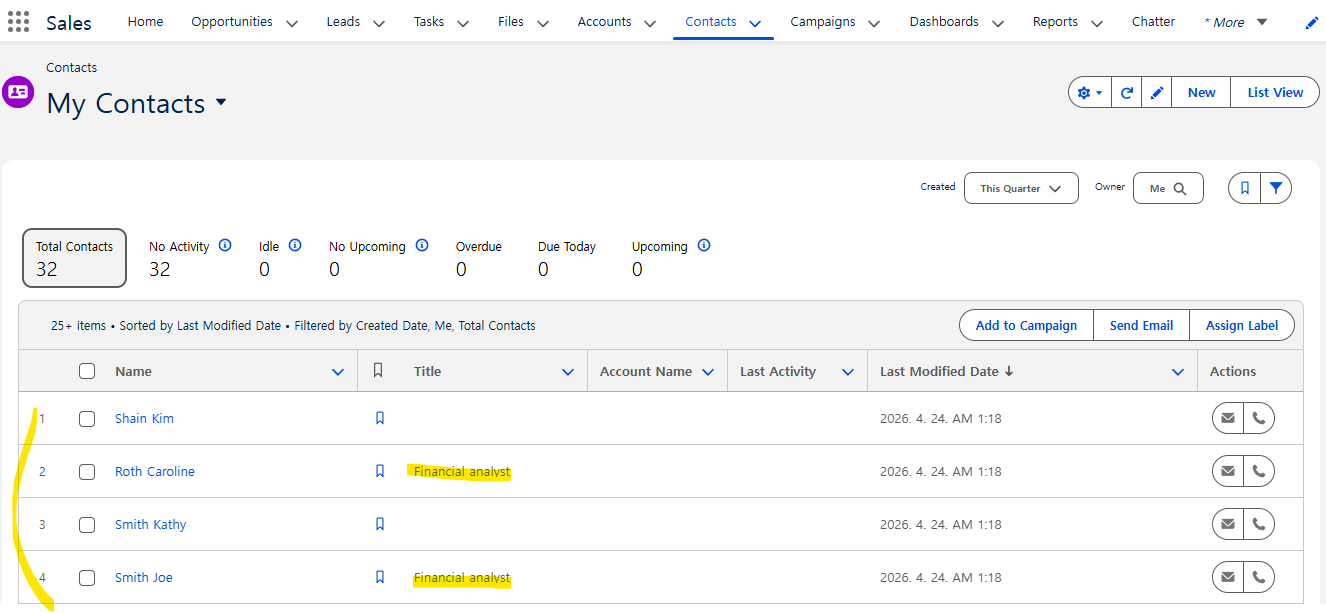
- 정상적으로 수행됨 확인~
Upsert
- 새로운 레코드와 기존 레코드가 섞인 List일 때,
upsert를 이용하여 insert + update 수행 - 중복 레코드 생성 방지
- 필드를 지정하지 않으면 sObject의 ID를 사용하여 Salesforce의 기존 레코드와 일치시킴
upsert sObject | sObject[]

upsert sObject | sObject[] field
// upsert sObjectList Account.Fields.MyExternalId;
- 수행 방식
- 키 일치 X -> 새 객체 레코드 생성
- 키 한 번이라도 일치 -> 기존 객체 레코드 업데이트
- 키 여러 번 일치 -> 오류 발생 및 객체 레코드 삽입/업데이트 X
예제 코드
Contact jane = new Contact(FirstName='Jane',
                         LastName='Smith',
                         Email='jane.smith@example.com',
                         Description='Contact of the day');
insert jane;
// 1. Upsert using an idLookup field
// Create a second sObject variable.
// This variable doesn’t have any ID set.
Contact jane2 = new Contact(FirstName='Jane',
                         LastName='Smith',
                         Email='jane.smith@example.com',
                         Description='Prefers to be contacted by email.');
// Upsert the contact by using the idLookup field for matching.
upsert jane2 Contact.fields.Email;
// Verify that the contact has been updated
System.assertEquals('Prefers to be contacted by email.',
                   [SELECT Description FROM Contact WHERE Id=:jane.Id].Description);
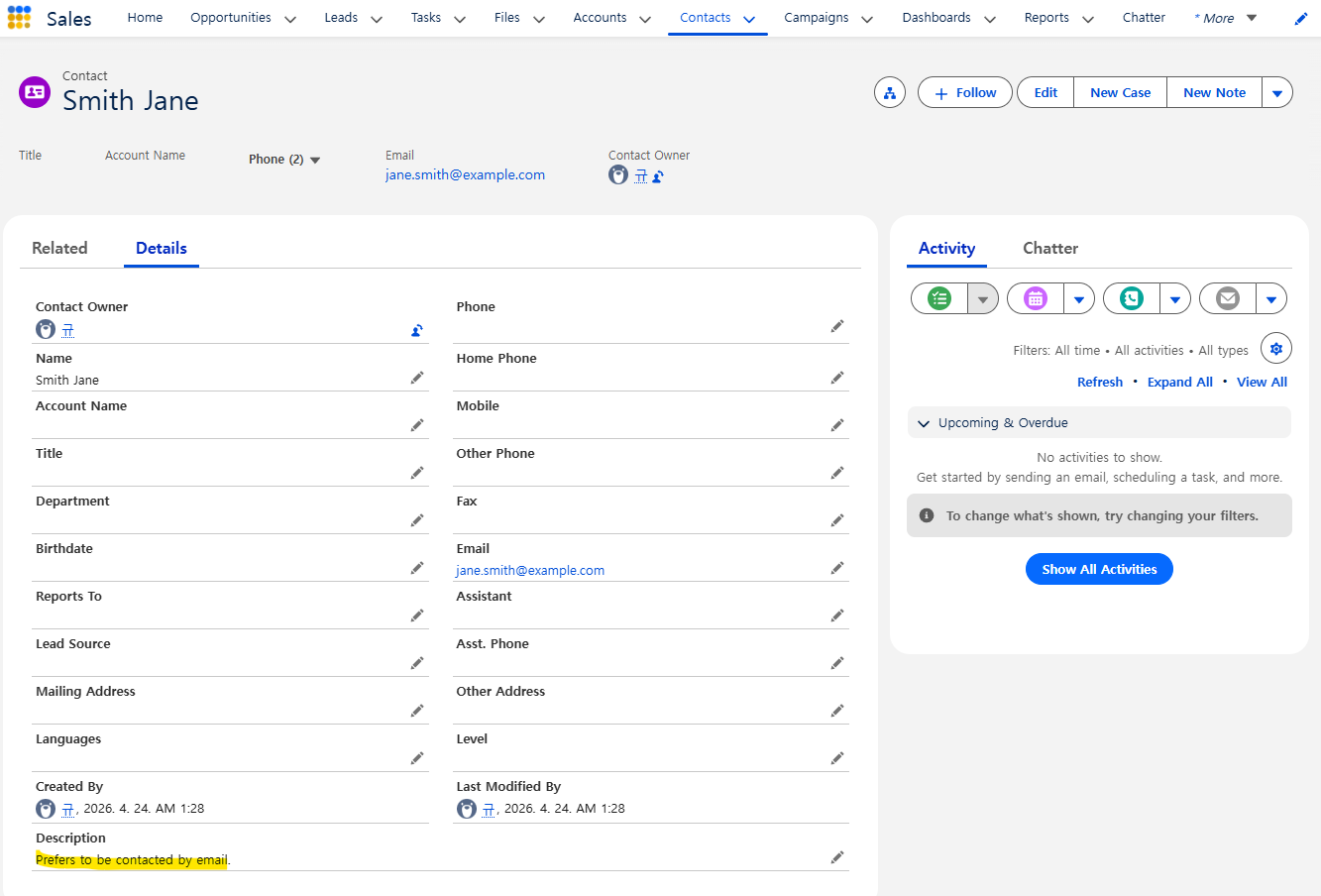
- 필드 지정해서 upsert 했을 때, jane2의 Description이 jane과 같은 레코드에 update됨
Delete
- 15일 동안 휴지통으로 이동, 복원 가능
Contact[] contactsDel = [SELECT Id FROM Contact WHERE LastName='Smith'];
delete contactsDel;
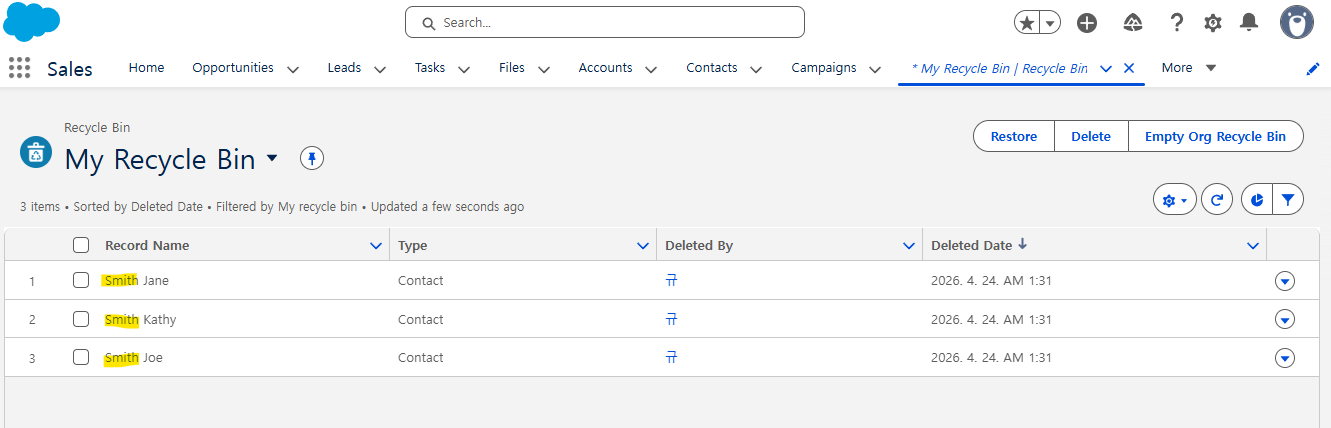
- 휴지통에서 확인 가능~
DML Exceptions
- DML 작업 실패 시,
DmlException발생
try {
        // This causes an exception because
        //   the required Name field is not provided.
        Account acct = new Account();
        // Insert the account
        insert acct;
        } catch (DmlException e) {
        System.debug('A DML exception has occurred: ' +
        e.getMessage());
        }
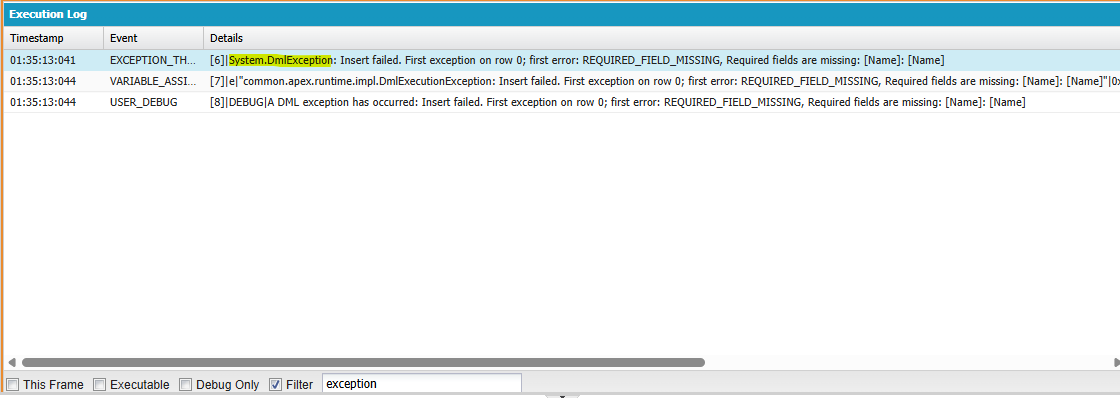
Database 방법
- Apex에는 DML 작업을 수행하는 메서드를 포함한 내장 클래스가 있음
- DML 문과 달리 작업이 부분적으로 성공해야 하는지 여부를 지정할 수 있음
메서드
- Database.insert()
- Database.update()
- Database.upsert()
- Database.delete()
- Database.undelete()
- Database.merge()
- Database 클래스에서 제공하지 않는 DML 문 - 트랜잭션 제어/롤백, 휴지통 비우기, SOQL 쿼리 관련 메서드
부분 성공 옵션
Database.insert(recordList, false);
- false -> 일부 레코드에서 오류 발생해도 성공한 레코드만 커밋
- 예외 발생하지 않음 주의
- default는 true
Database.SaveResult[] results = Database.insert(recordList, false);
- 성공/실패 결과 확인 가능
예제 코드
// Create a list of contacts
List<Contact> conList = new List<Contact> {
        new Contact(FirstName='Joe',LastName='Smith',Department='Finance'),
        new Contact(FirstName='Kathy',LastName='Smith',Department='Technology'),
        new Contact(FirstName='Caroline',LastName='Roth',Department='Finance'),
        new Contact()};
// Bulk insert all contacts with one DML call
Database.SaveResult[] srList = Database.insert(conList, false);
// Iterate through each returned result
for (Database.SaveResult sr : srList) {
    if (sr.isSuccess()) {
        // Operation was successful, so get the ID of the record that was processed
        System.debug('Successfully inserted contact. Contact ID: ' + sr.getId());
    } else {
        // Operation failed, so get all errors
        for(Database.Error err : sr.getErrors()) {
            System.debug('The following error has occurred.');
            System.debug(err.getStatusCode() + ': ' + err.getMessage());
            System.debug('Contact fields that affected this error: ' + err.getFields());
	 }
    }
}
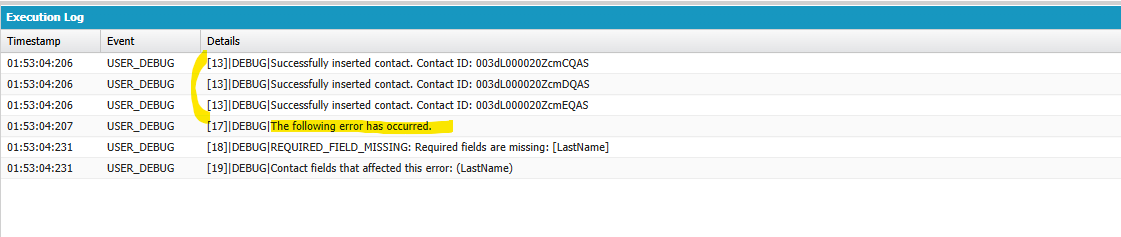
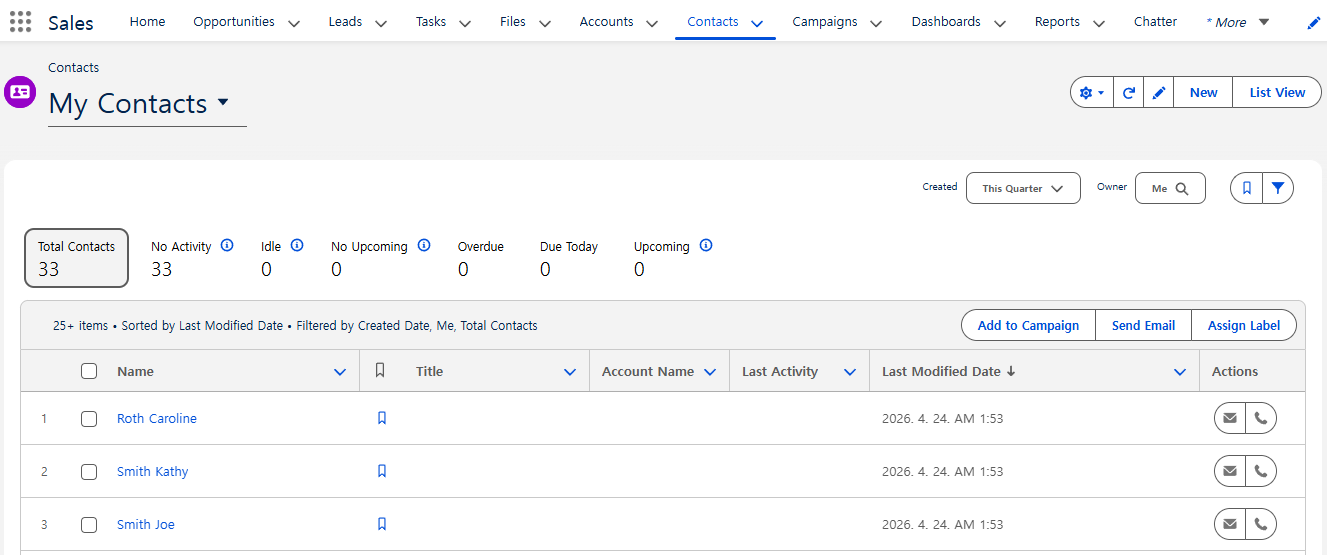
- 성공 건만 커밋 확인 가능~
DML Statements vs Database Methods
- DML 사용 -> Bulk DMl 처리 중 오류 발생 시 즉시 중단할 때
- Database 사용 -> partial success 옵션 사용할 때
- 반려된 레코드 감지 및 재시도 가능
- SaveResult을 통해 성공/실패 확인 가능
- Database 메서드에 예외 발생처리 있음
Related Records
Insert
Account acct = new Account(Name='SFDC Account');
insert acct;
// Once the account is inserted, the sObject will be
// populated with an ID.
// Get this ID.
ID acctID = acct.ID;
// Add a contact to this account.
Contact mario = new Contact(
    FirstName='Mario',
    LastName='Ruiz',
    Phone='415.555.1212',
    AccountId=acctID);
insert mario;
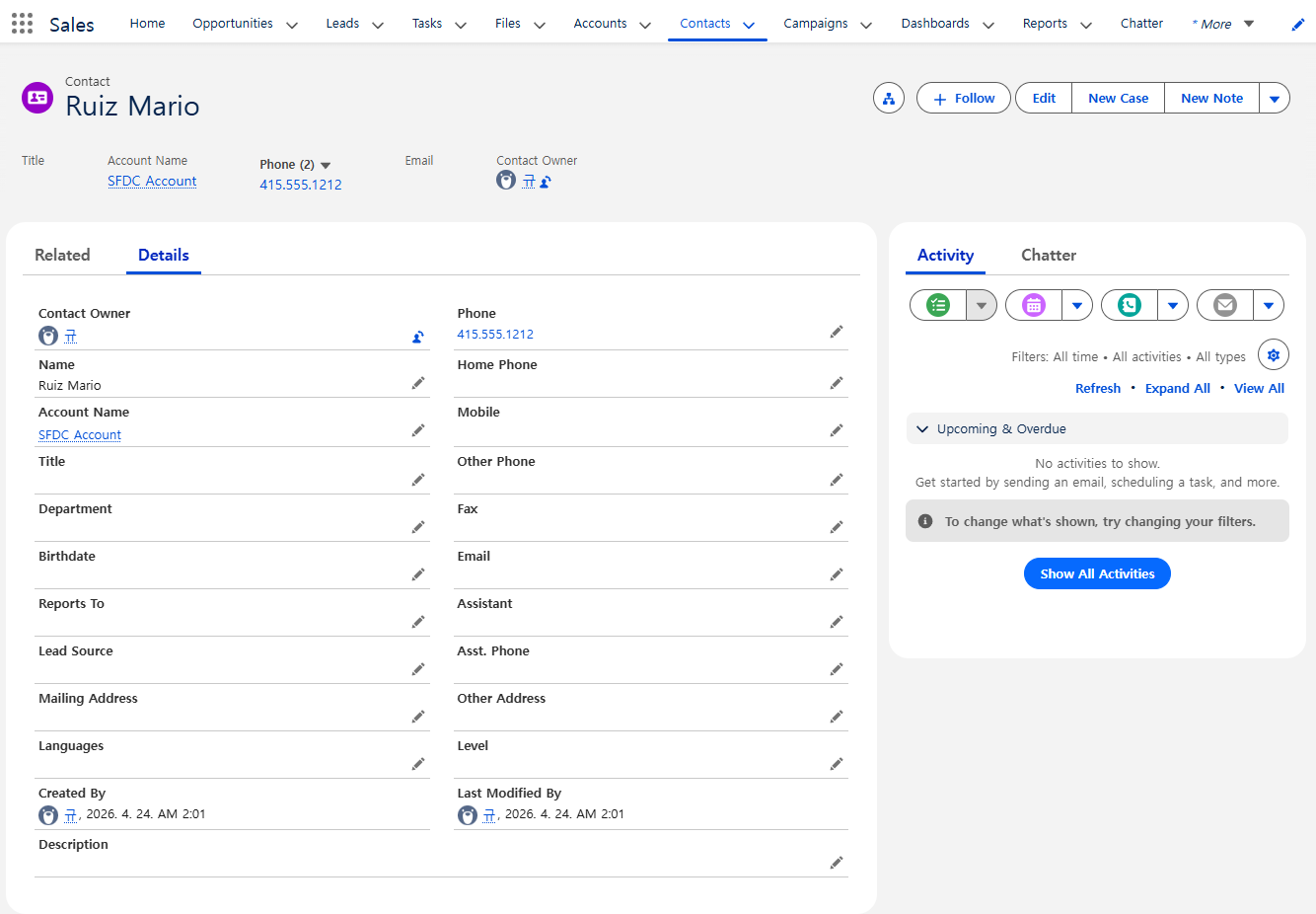
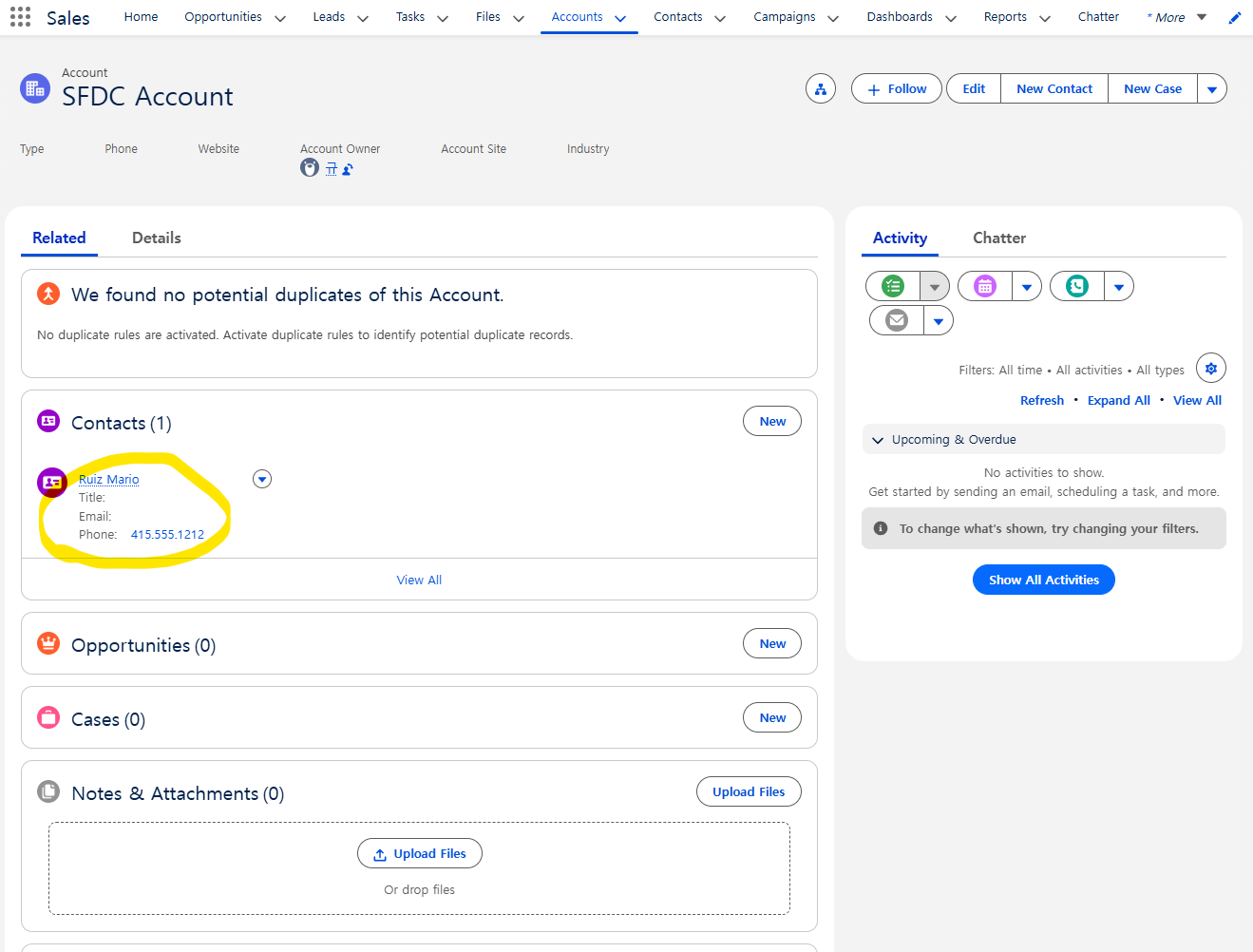
- Account - Contact 관계 생성 확인
Update
// Query for the contact, which has been associated with an account.
Contact queriedContact = [SELECT Account.Name
                          FROM Contact
                          WHERE FirstName = 'Mario' AND LastName='Ruiz'
                          LIMIT 1];
// Update the contact's phone number
queriedContact.Phone = '(415)555-1213';
// Update the related account industry
queriedContact.Account.Industry = 'Technology';
// Make two separate calls
// 1. This call is to update the contact's phone.
update queriedContact;
// 2. This call is to update the related account's Industry field.
update queriedContact.Account;
- Contact와 Account 각각 DML 호출 필요함
Delete
- 연쇄 작업 지원
Account[] queriedAccounts = [SELECT Id FROM Account WHERE Name='SFDC Account']; delete queriedAccounts; - SFDC Account 삭제 시, 연결되어있던 Mario Ruiz Contact도 삭제됨
Transactions
- DML은 트랜잭션 단위로 실행됨
- DML 한번 수행하는 동안 오류 발생 -> 전체 트랜잭션 롤백 및 커밋X
Hands-on
- 입력된 파라미터로 새로운 Account insert 하는 클래스 만들기
public class AccountHandler {
    public static Account insertNewAccount(String name) {
        try {
            Account acct = new Account();
            acct.Name = name;
            insert acct;

            return acct;
        } catch (DmlException e) {
            System.debug('A DML exception has occurred: ' +
            e.getMessage());

            return null;
        }

    }
}